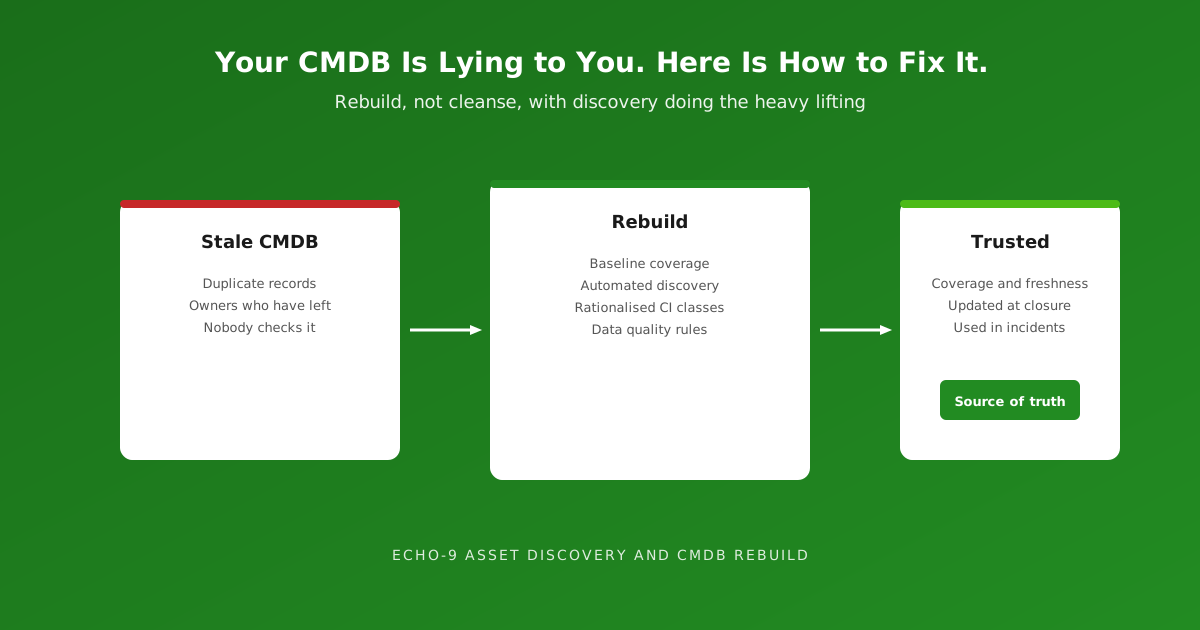
The CMDB trust spiral
Ask a service desk analyst whether they check the CMDB during an incident. Watch the pause.
The honest answer is usually "sometimes" — followed by the reasons. The server listed as live was decommissioned last year. The owner left in 2023. The laptop is assigned to someone in a different department. There are three records for the same switch.
So people work around it. They ask a colleague, check the monitoring tool, or look at the device itself. Every workaround is a small vote of no confidence, and every vote makes it less likely that anyone will update the record next time.
This is the CMDB trust spiral: inaccurate data leads to low usage, low usage leads to fewer updates, fewer updates lead to worse data. Eventually the CMDB exists mainly so that an audit can confirm you have one.
Why it matters more than it used to
A stale CMDB was once an inconvenience. It is now a risk.
The NCSC's recent advisory on operational technology opened with a single instruction: build a definitive view of your assets. Cyber Essentials v3.3 asks detailed questions about which devices and cloud services are in scope. Ransomware response depends on knowing what was affected. Licence audits depend on knowing what is installed.
Every one of those starts with the same question: do you know what you have? A CMDB nobody trusts cannot answer it.
Five reasons CMDBs fail
In our experience, CMDBs rarely fail because of the tool. They fail for predictable, fixable reasons.
- Manual population. Records are created by hand during a project and never updated. The data is accurate for a week.
- Too many CI classes. Someone modelled everything — every cable, every licence key, every virtual NIC. The model is too big to maintain.
- No data quality rules. Nothing stops duplicates, blank owners or impossible states such as a "retired" server with open incidents.
- No ownership. Every CI needs someone accountable for its accuracy. When everyone owns the CMDB, nobody does.
- Disconnected from daily work. If changing a laptop's user does not touch the CMDB, the CMDB will always be behind reality.
Rebuild, not cleanse
The instinctive response is a data cleansing exercise: export everything, fix it in a spreadsheet, import it back. It feels productive. Six months later, the data has drifted again, because none of the causes above has changed.
Echo-9's Asset Discovery and CMDB Rebuild approach starts from the causes instead:
- Baseline coverage. Measure what you have today against what is actually on the network. The gap tells you where to focus.
- Select discovery methods. Decide which sources are authoritative for which data — the agent for endpoint hardware, network discovery for switches and printers, identity systems for users.
- Rationalise CI classes and relationships. Model what you will actually use during incidents, changes and audits. Nothing more.
- Implement data quality rules and reconciliation. Define what "good" looks like, then measure it automatically.
The outcomes are practical: a source-of-truth model, discovery runbooks, a CI taxonomy, data quality scoring, and coverage and accuracy reports that show whether the CMDB is getting better or worse.
Discovery as the primary source
The single biggest improvement is letting machines populate what machines can see.
In GLPI, the GLPI Agent inventories Windows, macOS and Linux endpoints — hardware, software, users and network details — on a schedule, with no human involved. Network discovery and SNMP inventory identify switches, routers, printers and other network-connected devices. Remote inventory reaches segmented networks and devices where an agent cannot be installed.
In the integrated Echo-9 stack, Wazuh agents sync with GLPI device records, linking security data to the same assets. The CMDB becomes the place where every source meets, rather than one more source competing for attention.
Humans then add what discovery cannot know: business service, criticality, owner and location. That is a much smaller job, and one worth doing well.
Keeping it right
A rebuilt CMDB stays accurate only if updating it is part of normal work, not a separate chore.
- At ticket closure. Our AI Closure and ITAMation plugin proposes asset updates when a ticket closes — reassign the user, update the location, return a device to stock — and applies them after analyst approval.
- At joiners, movers and leavers. Identity changes should trigger asset changes, not wait for the next audit.
- At change. Approved changes update the configuration items they affect.
- At every discovery run. Scheduled discovery catches drift, new devices and unrecorded changes automatically.
Making it visible
A CMDB people can see is a CMDB people use. ServiceMap turns GLPI's discovery and impact data into an interactive topology canvas, with live incidents overlaid on the affected configuration items. When the map is right, people rely on it. When it is wrong, they notice — and fix it.
Measuring CMDB health
You cannot improve what you do not measure. Data quality scoring turns "the CMDB is a mess" into specific numbers leadership can track:
- Coverage — what percentage of discovered devices have a CMDB record
- Completeness — what percentage of records have an owner, location and business service
- Freshness — how many records have been confirmed by discovery in the last 30 days
- Duplicates and conflicts — how many records disagree across sources
Reported monthly, those numbers show whether the trust spiral is running forwards or backwards.
The bottom line
A CMDB is only as good as the last time someone trusted it.
Cleansing fixes the data once. Rebuilding fixes the reasons it went wrong. With discovery doing the heavy lifting, data quality rules catching errors, and updates built into everyday service desk work, the CMDB becomes what it was always supposed to be — the place people look first.
Book a CMDB conversation
If your CMDB exists mainly for the auditors, we would welcome a conversation about what a rebuild could look like in your environment.